
A shopper searches your store for a jeans jacket. She likes two of them, but not enough to buy today. She closes the tab, and the next time she thinks about jeans jackets, she’s on someone else’s site. Next week you add three new ones she would have loved. She never sees them.
That gap is what we built Search Subscriptions for. It’s live today in beta for stores on the Pro plan, and this post explains what it does, what we were careful about, and how to make the most of it.
Key takeaways
- A shopper can subscribe to any search in your store, like “jeans jacket”, right from the search results.
- Once a week at most, they get one email with the new products that match, and only products that are in stock when it’s sent.
- No new products means no email. Every email says why it came, and stopping takes one tap.
- Your panel shows which searches people follow, so you see demand before it turns into sales.
- It’s in beta for Pro stores now, in English and Hebrew.
What Search Subscriptions does
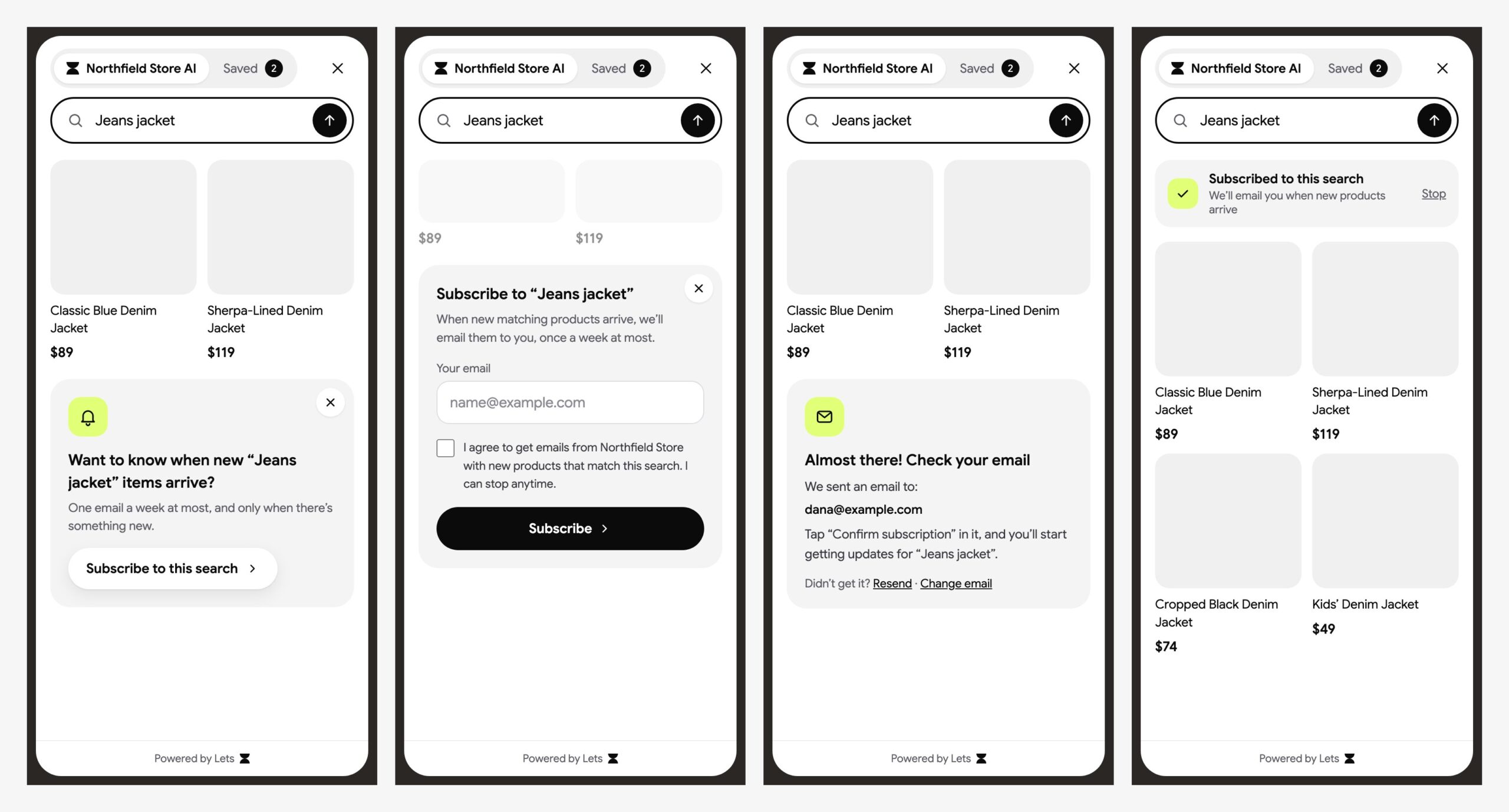
Think of it as following a search. A shopper types what they want, sees the results, and at the end of the list finds a small card: “Want to know when new ‘Jeans jacket’ items arrive?” They leave their email, tick a box that says plainly what they’re agreeing to, and confirm from their inbox.
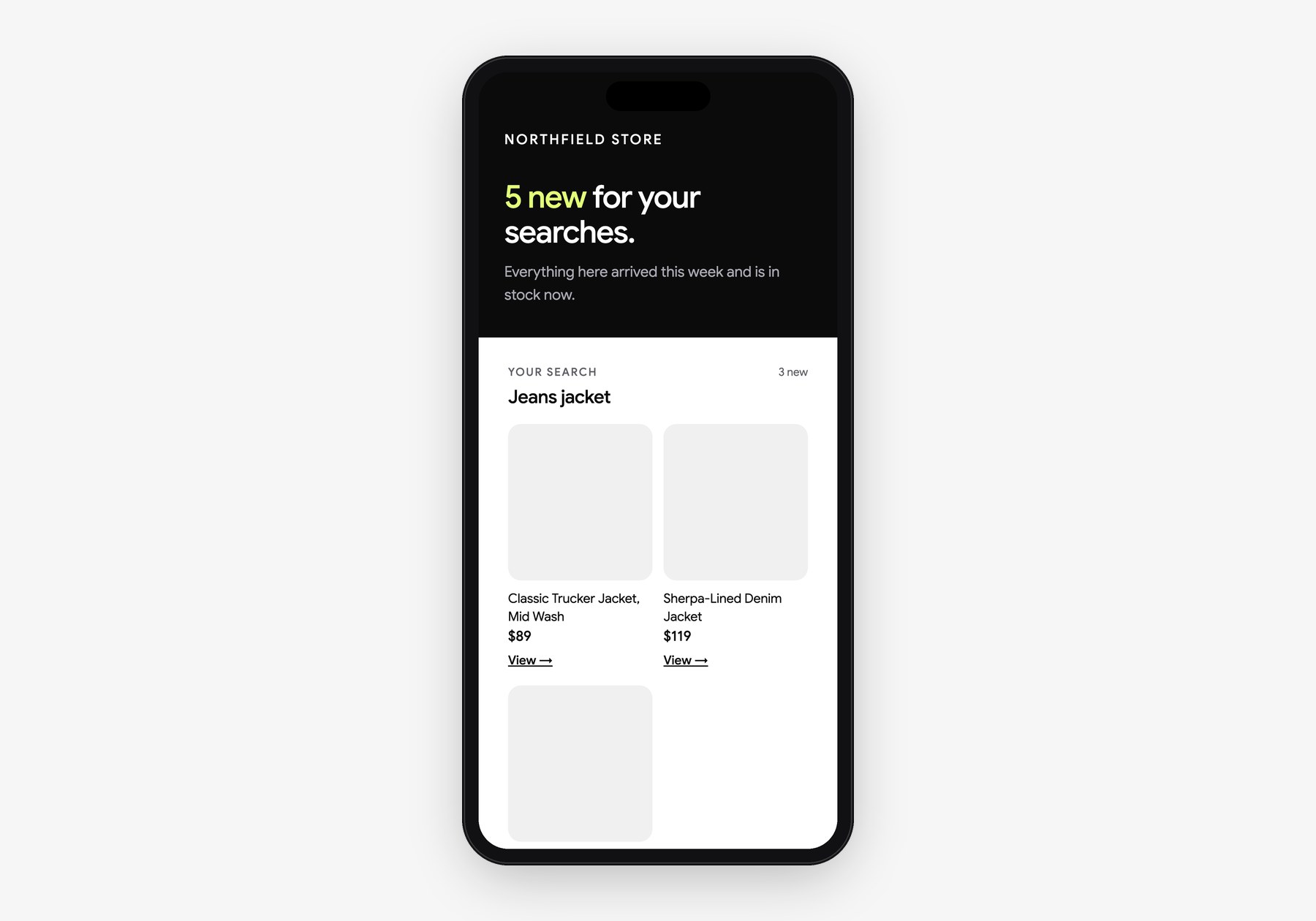
From then on, Lets checks your store every week. If you added products that match their search, they get one email with them. If you didn’t, they hear nothing.
Built to never feel like spam
Back-in-stock and price-drop emails taught us one thing: people love them until the third email that has nothing to do with what they wanted. So we wrote the rules before we drew a single screen.
- One email a week, at most. Per shopper, per store. A shopper who follows five searches still gets one email, with a section for each.
- Only when there’s something new. New means added to your store after they subscribed. No “nothing new this week” emails.
- Only what’s in stock. Stock is checked right before sending. A product that sold out on Wednesday won’t be in Thursday’s email.
- Six products, tops. It’s an update, not a catalog. If more arrived, they get the best matches.
- Strict matching. Missing a product is better than sending one that doesn’t belong. A jeans jacket follower won’t get jeans.
- Never the same product twice.
Clear consent, easy exit
The sign-up box is never pre-ticked, and it names your store and the search, so shoppers know exactly what they’re signing up for. Then comes a confirmation email: nothing is sent until they tap “Confirm subscription”. That also stops anyone from signing up someone else’s address.
Leaving is just as clear. Every email has a “Stop this search” link under each search and an “Unsubscribe from all” link at the bottom, and both work in one tap, without logging in. The emails also carry the standard one-click unsubscribe headers, so Gmail and other inboxes show their own unsubscribe button.
Searches don’t live forever either. After 90 days, the shopper gets a short “Still interested?” email. One tap keeps the search for another 90 days. Doing nothing stops it.
The weekly email
The email comes from your store’s name, and replies go to your store’s address. Each search gets its own section, with the products that arrived and a link to each one. A short line at the bottom says why the shopper is getting it.
What a follower gets
jeans jacket3 new jackets, in stock, in Thursday’s emailadded after they subscribed
white leather sneakersnothing this week, so no emailno new matches
linen dressleft out of the emailthe only new one sold out before sending
What you get as a store owner
Every subscription is a shopper telling you, in their own words, what they want to buy next. Your panel collects them into one list: the searches people follow, with how many follow each one. When 140 people follow “jeans jacket”, that’s a buying decision, not a guess.
The panel also shows sign-ups, opens, clicks and the sales that came from these emails, so you can see what it brings in. The same numbers appear in your weekly store report.
How to get the most out of it
- Leave the offer on for every search, not only the ones that find nothing. The best subscribers are shoppers who liked what they saw.
- Look at the most-followed searches every month. They’re a short, honest list of what to stock more of.
- Name new products the way shoppers search. If people follow “jeans jacket”, a product called “Denim Trucker, Indigo” still matches, but clear names and details make matching sharper.
- Add products as they arrive, not all at once at the end of the season. Weekly emails work best with a steady trickle of new things.
Why it’s in beta
We’re starting with Pro stores so we can watch how it behaves on real catalogs: how strict the matching should be, which send day works best, and how shoppers react to the emails. We’ll tune it from what we see, and tell you what changed. If something feels off, write to us. That’s exactly what the beta is for.
Frequently asked questions
What is a search subscription in an online store?
It lets a shopper follow a search, like “jeans jacket”, and get an email when new products that match it are added to the store. In Lets, that email comes once a week at most, and only when there’s something new and in stock.
Will my shoppers get too many emails?
No. Each shopper gets at most one email a week from your store, no matter how many searches they follow, and nothing at all in a week with no new matches.
Is it different from a back-in-stock alert?
Yes. A back-in-stock alert is about one product coming back. A search subscription is about new products that match what the shopper searched for, including ones that didn’t exist when they subscribed.
Which plans include Search Subscriptions?
It’s in beta on the Pro plan, on Shopify and on WordPress with WooCommerce. The search drawer works in English and Hebrew, and the emails are sent in English.
How do shoppers unsubscribe?
With one tap from any email, for one search or for all of them, without logging in. Searches also end on their own after 90 days unless the shopper chooses to keep them.
Sources
- Email sender guidelines, Google
- Signaling One-Click Functionality for List Email Headers (RFC 8058), IETF

Front-end developer and UX designer who reads search logs for fun. Tomer obsesses over the milliseconds between a keystroke and a result, has strong opinions about border radii, and believes no shopper should ever meet an empty results page. He builds everything you touch in Lets.
See it on your store.
Leave your details and we'll set Lets up on your catalog. Typos, questions and photos, answered from your own products. 30-day money-back guarantee.
You're in. We'll email you shortly with how to set Lets up on your store.