
Most site search analytics look like a server log: a long table of words, a few counts, and no idea what to do next. We had that problem too. Our own panel had five different screens that showed searches that found nothing, and none of them told a store owner what to do about it.
So we rebuilt it. Before writing a line of design, we wrote down the three questions a store owner actually opens the panel to answer, and gave every screen one job: answer one of them in about five seconds. Here’s a first look at what we’re building.
Key takeaways
- The new panel opens on one screen, Today, that says what search earned, what changed this week and what’s worth fixing.
- Every problem comes with a suggested fix you approve in one tap, and the panel shows what the fix brought in afterwards.
- Searches are shown the way shoppers typed them, next to what they found, so patterns are easy to spot.
- Everything shoppers see is set in one place, with a live preview that changes as you change a setting.
Three questions, one screen to start
A store owner opens the panel for a few minutes, usually between other things. In that time they want to know three things, in this order:
- Is it working? How many shoppers searched, how many found something, and how much was sold after a search.
- What does my audience want? What they’re searching for right now, what’s rising and what they keep asking.
- What can I improve today? A short list, ordered by how many shoppers it affects.
The Today screen answers all three before you scroll. Sales through search come first, with the change from last week. Below it sits a short list called Waiting for you, and next to it, the searches happening in the store right now.
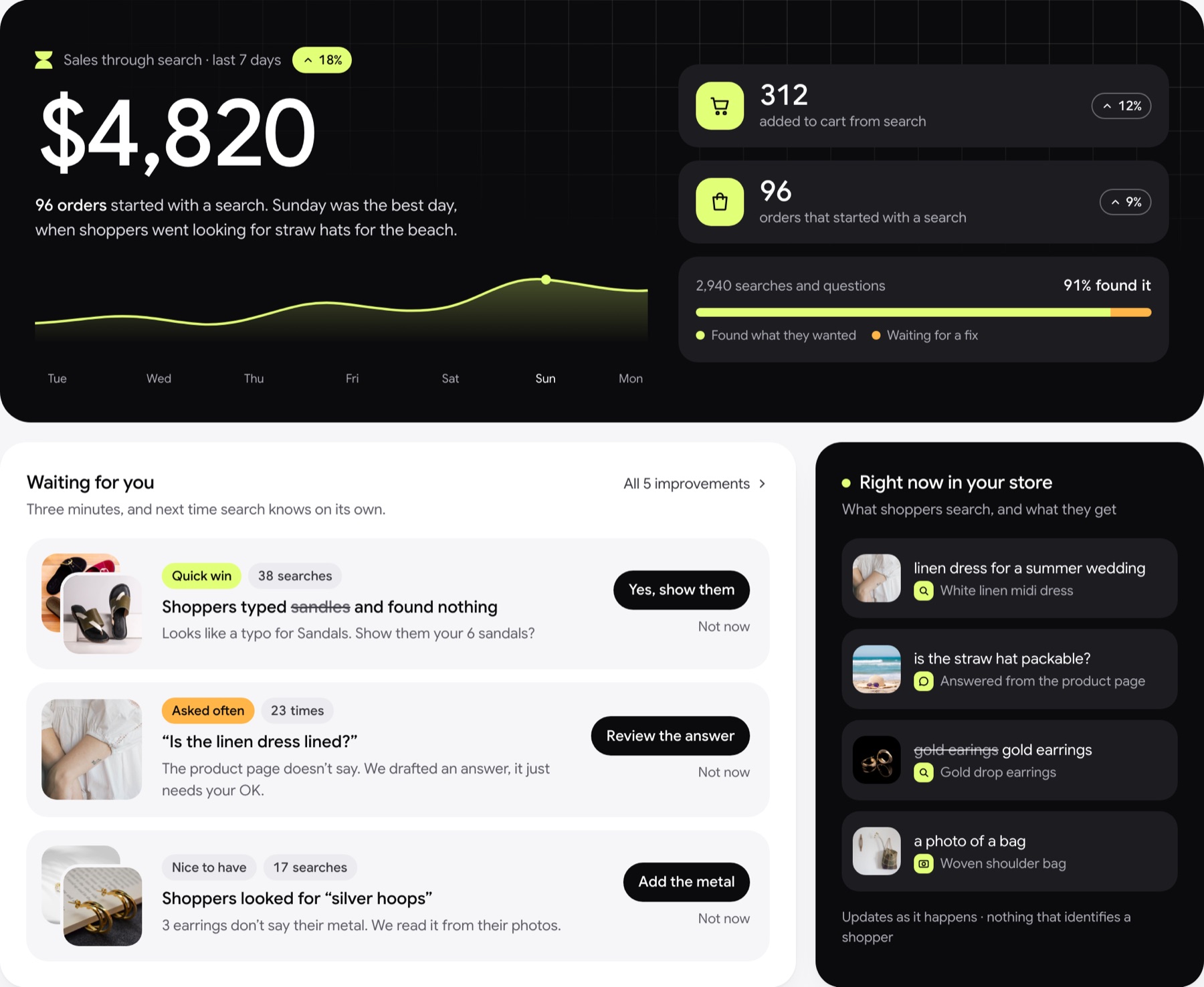
Site search analytics that end in an action
A failed search is a shopper telling you what’s missing. The trouble is that a list of failed searches leaves the work to you: figure out why, decide what to change, then go find where to change it. In the new panel, every item in Improvements arrives with its reason and a suggested fix (we take a closer look at how Improvements fixes failed searches separately).
- Found nothing. Shoppers typed “sandles” and got no results. The suggestion: read it as “sandals”, with a preview of the products they’ll see.
- Found results, but nobody clicked. “Summer dress” showed sweaters first, because their description says “summer to fall”. The suggestion: show the dresses first.
- A question with no answer. “Is the linen dress lined?” came up again and again. The suggestion: a drafted answer from the product’s photos and pages, which you check and publish.
- A missing product detail. Earrings with no metal listed, so shoppers who filtered by “gold” missed them. The suggestion: the metal, read from each photo.
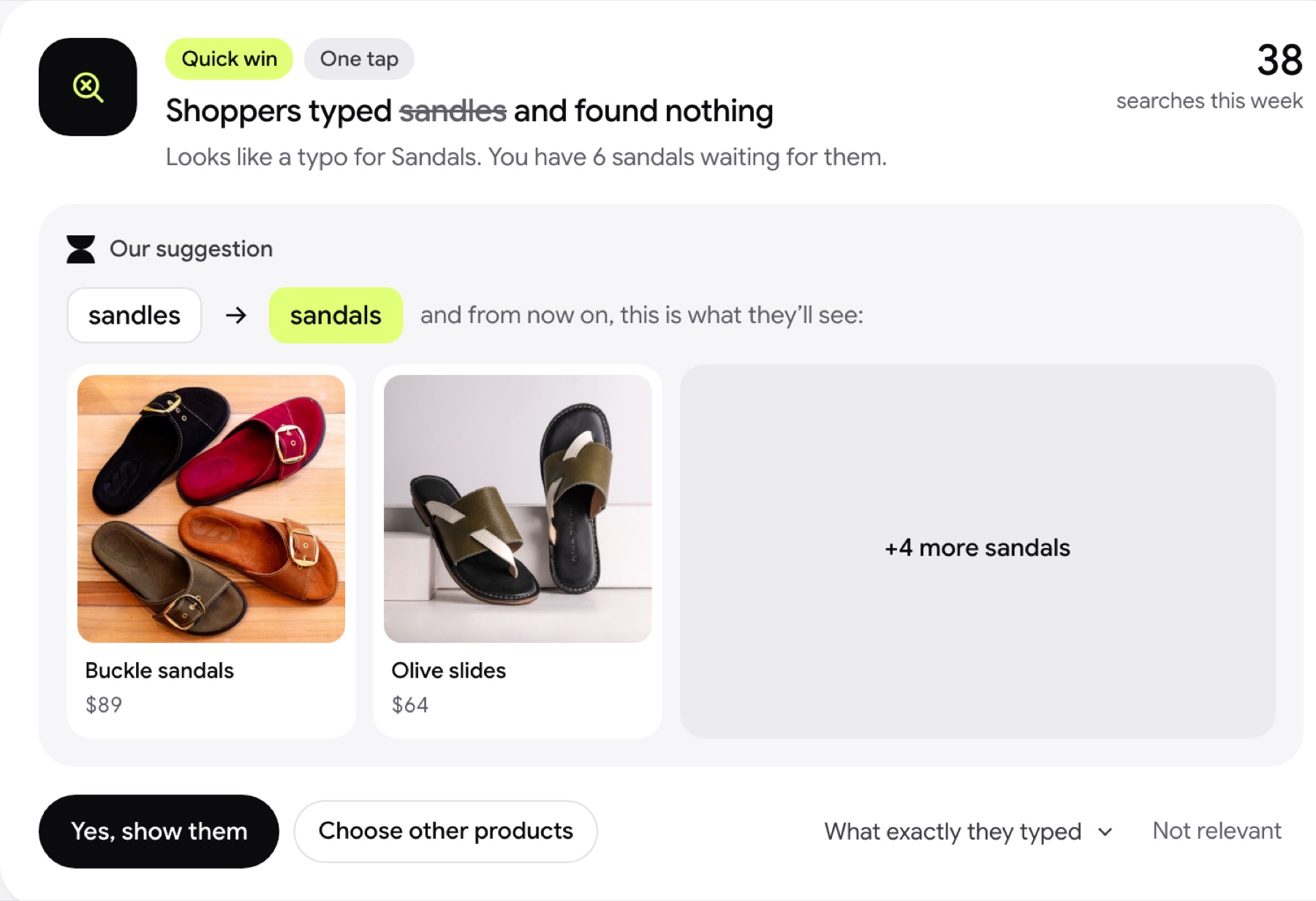
Clear typos don’t wait for you at all. They’re fixed on their own and listed under Fixed by Lets, each with an undo. What needs your judgment waits for you. That split matters: the panel should save you work, not hand you a to-do list. If you want the background on why these searches fail in the first place, we covered it in what zero-result searches tell you.
Proof that a fix worked
The part we’re most excited about is small: after you approve a fix, the panel keeps counting. How many searches found something since, how many added to cart, how much it sold. A fix stops being a guess and becomes a result you can see the next morning.
Before and after one approved fix
sandlesNothing foundbefore
sandlesBuckle sandals, olive slidesafter one tap
swimsuit cover upBeach setcounted since you approved it
What shoppers want, in their own words
Shoppers rarely search the way a catalog is written. They describe a moment: “for a wedding”, “for the beach”, “gift for mom under $100”. The Searches screen keeps their words as they typed them and puts the most common phrases side by side, which makes patterns hard to miss. It also shows which searches are rising, what shoppers asked, and what they found when they searched with a photo.
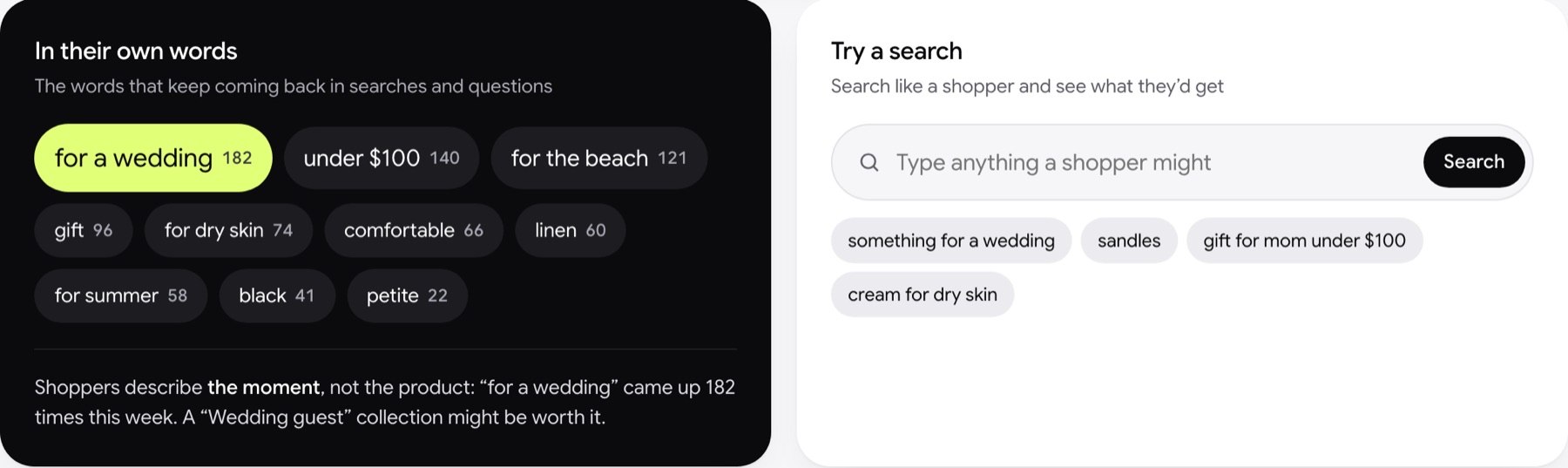
Next to it is a search box that runs on your own products. Type what a shopper might, and see what they’d get and how search understood it: a typo it corrected, an occasion it recognized, a price limit it applied. It’s the quickest way to understand how search by meaning differs from keyword search, using your own catalog.
Full control over what shoppers see
Search lives on your site, so you should be able to see exactly what your shoppers see, and change it without a developer. The new What shoppers see screen puts every setting in one place, with a live preview at the top: switch photo search off and the camera disappears from the preview; switch to your store’s look and the window takes your fonts, colors and corners.
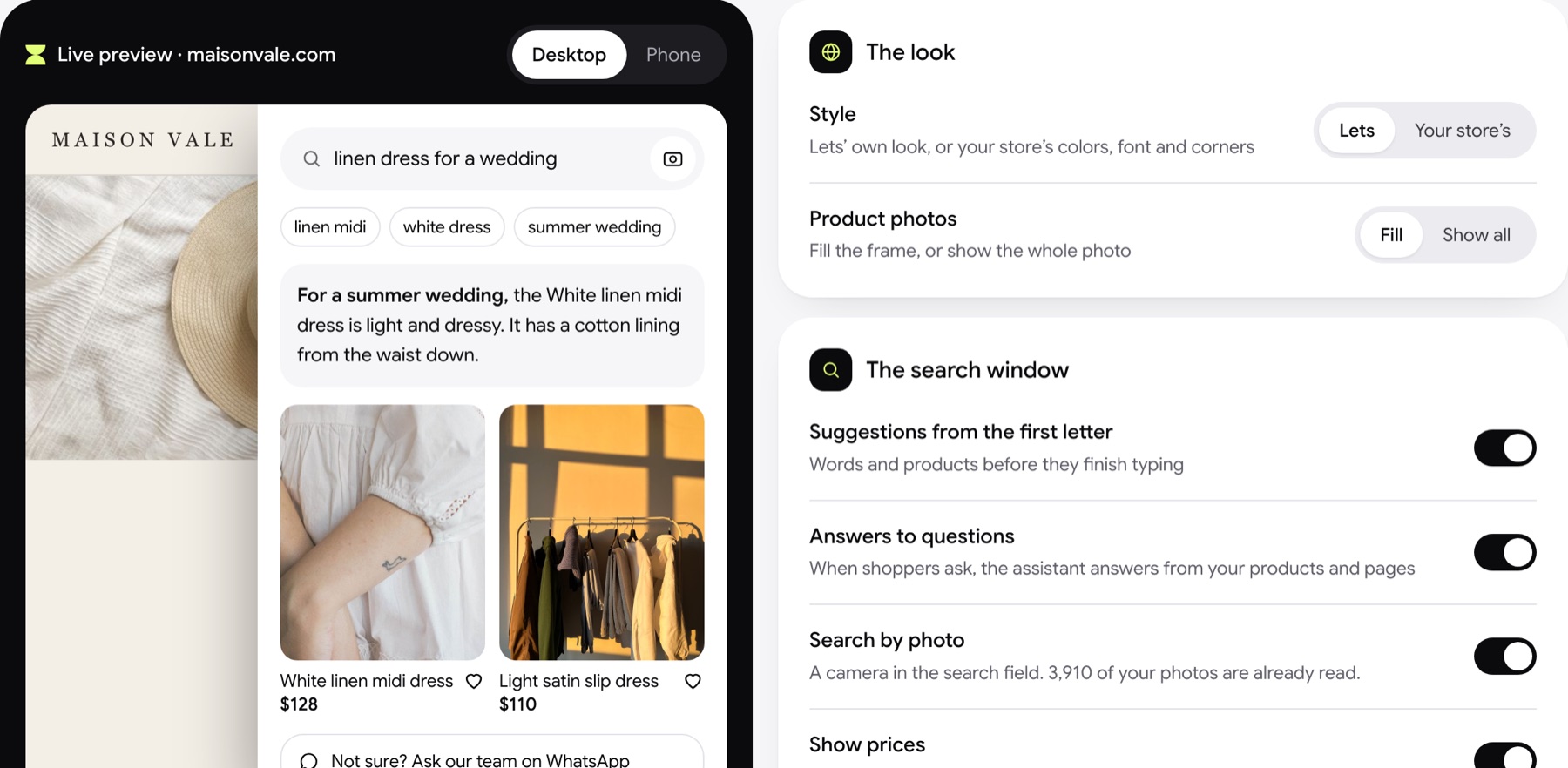
The same idea runs through the rest of the panel. Store knowledge shows what Lets learned from your products and pages and where it learned it, and lets you add what your pages don’t say in one sentence. Shoppers shows who’s waiting for a reply, and each visit as a short story: what they searched, what they saw, how it ended.
Built for the first day, too
A panel full of charts looks great in a demo and empty on the day you install. We designed the first day on purpose: the moment search goes live, Today shows what’s already done (connected, products read, search live), what Lets already knows about your store, and a way to try it yourself while you wait for the first shopper. Every empty screen says what will appear there and what you can do now.
The panel is in English by default, with a full Hebrew version, right to left, one tap away. It works on Shopify and WordPress, and on a phone as well as a laptop. With more shoppers starting their search with an assistant, as we wrote in how AI assistants pick products from your store, knowing how your own shoppers phrase things is only getting more useful.
Frequently asked questions
What is site search analytics?
It’s the record of what visitors type into your store’s search box, what they find and what they do next. It’s one of the clearest signals you have of what shoppers want, in their own words.
Do I have to approve every fix?
No. Clear typos are fixed on their own and can be undone in one tap. Fixes that need your judgment, like which products to show first or how to answer a question, wait for your approval.
Can I see what shoppers see before I change a setting?
Yes. The What shoppers see screen shows a live preview of the search window, on desktop and on a phone, and updates as you change each setting.
When will the new panel be available?
We’re building it now. Stores on Lets will get it as an update to the panel they already use, with nothing to install.

Back-end engineer and AI specialist who thinks in vectors and dreams in latency budgets. Aviad builds the engine under Lets: the indexes, the embeddings, the AI answers and the systems that keep them fast and secure. If a query takes longer than a blink, he takes it personally.
See it on your store.
Leave your details and we'll set Lets up on your catalog. Typos, questions and photos, answered from your own products. 30-day money-back guarantee.
You're in. We'll email you shortly with how to set Lets up on your store.